










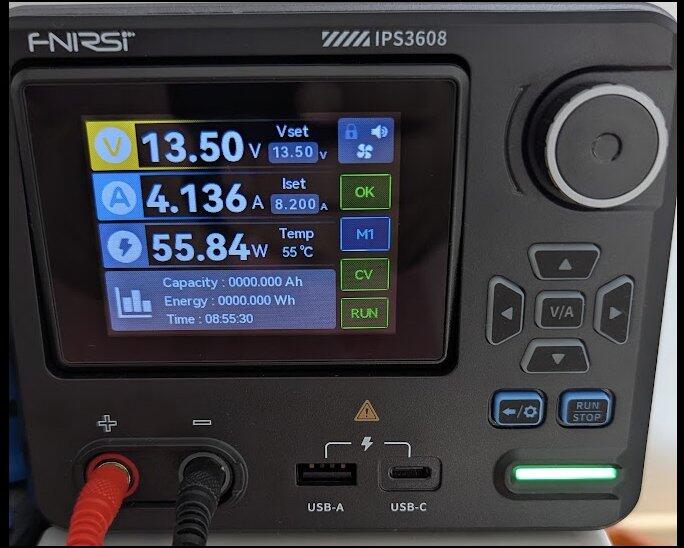
IPS3608 es una fuente de alimentación digital inteligente AC-DC que utiliza tecnología de control digital para convertir eficientemente la energía AC en energía DC. Es mucho más inteligente que las fuentes de alimentación tradicionales. Tiene las características de ajuste de parámetros conveniente, salida de alta precisión, fuerte respuesta dinámica, interfaz de control digital conveniente y múltiples protecciones eléctricas.
Especificaciones
Parámetros básicos:
Modelo
IPS3608
Material de la pantalla
Pantalla a color de 2.8 pulgadas
Retroiluminación
Brillo de retroiluminación ajustable
Idioma
中文, English
Tamaño del producto
≈138×214×115mm
Peso del producto
≈1539g
Parámetros de la batería:
Entrada
Rango de voltaje: 100-240VAC(50/60Hz)
Resolución de ajuste
Voltaje: 0.01V
Corriente: 0.001A
Corriente: 0.001A
Precisión del valor de lectura
Voltaje de salida: ±(0.3%+3 bits)
Corriente de salida: ±(0.15%+5 bits)
Corriente de salida: ±(0.15%+5 bits)
Entorno de operación
-10℃~40℃, 0%~75%RH
Mecanismo de Protección
◾ Protección contra sobretensión
◾ Protección contra sobrecorriente
◾ Protección contra sobrepotencia
◾ Protección contra sobretemperatura
◾ Protección contra subtensión
◾ Protección contra cortocircuitos
◾ Protección contra conexión inversa de entrada
◾ Protección contra inyección inversa de salida
◾ Protección contra sobrecorriente
◾ Protección contra sobrepotencia
◾ Protección contra sobretemperatura
◾ Protección contra subtensión
◾ Protección contra cortocircuitos
◾ Protección contra conexión inversa de entrada
◾ Protección contra inyección inversa de salida
Salida
Voltaje: DC 0~36V
Corriente: 0~8A
Potencia: 0~285W
Corriente: 0~8A
Potencia: 0~285W
Tasa de regulación de carga
±(0.2%+2 bits)
※Método de cálculo de precisión: un byte es la resolución mínima, como 5V, el error es ±(5 x 0.3% + 3 x 0.01), es decir, 5 ± 0.045V
Protocolo de carga rápida:
USB-C
PD3.0
USB-A
HUAWEI FCP
HUAWEI SCP
AFC
QC2.0
QC3.0
HUAWEI SCP
AFC
QC2.0
QC3.0
Lista de paquete:
◉ Host IPS3608 × 1
◉ Cable de alimentación × 1 (Enchufe US o EU)
◉ Cable con pinza de cocodrilo × 2 (Negro y Rojo)
◉ Cable de datos × 1
◉ Manual de usuario × 1
◉ Caja de embalaje × 1
◉ Cable de alimentación × 1 (Enchufe US o EU)
◉ Cable con pinza de cocodrilo × 2 (Negro y Rojo)
◉ Cable de datos × 1
◉ Manual de usuario × 1
◉ Caja de embalaje × 1


Lista de Contenido:
◉ Host IPS3608 × 1
◉ Cable de alimentación × 1 (Enchufe US o EU)
◉ Cable con pinza de cocodrilo × 2 (Negro y Rojo)
◉ Cable de datos × 1
◉ Manual de usuario × 1
◉ Caja de embalaje × 1
◉ Cable de alimentación × 1 (Enchufe US o EU)
◉ Cable con pinza de cocodrilo × 2 (Negro y Rojo)
◉ Cable de datos × 1
◉ Manual de usuario × 1
◉ Caja de embalaje × 1
Uso del Entorno y Precauciones
El dispositivo debe almacenarse en una funda blanda, y el entorno de operación debe estar a una temperatura de -5~40℃, y la humedad relativa no debe exceder el 80%.
El dispositivo debe almacenarse en un lugar limpio y seco para evitar la humedad, el moho, la presión excesiva, daños mecánicos, la humedad y la luz solar directa.
Evite usarlo en la lluvia o en la niebla, evite dejarlo caer o golpearlo.
Cuando la pantalla del LCD no se enciende, indica que el voltaje es demasiado bajo y necesita ser cargada a tiempo.
Derechos de autor
Las especificaciones del producto están sujetas a cambios sin previo aviso, todos los derechos de interpretación final fueron reservados por FNIRSI Technology Co., Ltd. Todas las marcas registradas, imágenes de productos y parámetros técnicos son propiedad de FNIRSI Technology Co., Ltd. Todos los derechos reservados.
Garantía
Garantía de devolución y reembolso de 30 días (Consulte nuestra Política de Reembolso), garantía de 2 años (disponible solo para pedidos comprados directamente en fnirsi.com), soporte técnico de por vida por FNIRSI.
No dude en comunicarse con nosotros si tiene alguna inquietud:
Correo electrónico: service@fnirsi.com / info@fnirsi.com
Nos esforzamos por responderte dentro de 24 horas.
FNIRSI ha comenzado a investigar y desarrollar productos ópticos de calidad, incluyendo telémetros de golf, láseres, dispositivos de medición y binoculares desde 2016.
Enfocarse en el desarrollo, la investigación y la fabricación durante más de 8 años.
Estamos comprometidos a ofrecer productos de primera calidad y un servicio al cliente excepcional, esforzándonos por ser su asistente más confiable e inteligente.
En Fnirsi, estamos comprometidos a ofrecer a nuestros clientes el mejor valor por sus compras. Para asegurarnos de que siempre obtenga el mejor precio, ofrecemos una garantía de precio de 30 días en todos los productos comprados directamente en fnirsi.com. Esta política tiene como objetivo brindarle confianza y tranquilidad al comprar con nosotros.
¿Qué es la Garantía de Precio de 30 Días?
Nuestra garantía de precio de 30 días significa que si compra un producto en fnirsi.com y el precio de ese producto baja dentro de los 30 días posteriores a la fecha de su compra, usted es elegible para un reembolso de la diferencia de precio de los productos. (Los precios se basan en USD. No se otorgarán reembolsos por cambios de precio en otras monedas debido a fluctuaciones en el tipo de cambio.)
¿Cómo se Aplica la Garantía de Precio?
- Elegibilidad: La garantía de precio se aplica solo a las compras realizadas en fnirsi.com. Los productos comprados en otros minoristas o vendedores terceros no son elegibles.
- Plazo: La caída de precio debe ocurrir dentro de los 30 días posteriores a la fecha original de su compra.
- Coincidencia de Producto: La garantía de precio se aplica al mismo producto (modelo idéntico, especificaciones y condición).
Cómo Solicitar un Reembolso por Diferencia de Precio
Si nota que el precio de un producto que compró en fnirsi.com ha bajado dentro de los 30 días, siga estos pasos para solicitar un reembolso de la diferencia de precio:
- Documentación: Prepare su número de pedido y prueba de la caída de precio (como una captura de pantalla y enlace a la página del producto que muestra el precio reducido).
- Contáctenos: Comuníquese con nuestro equipo de atención al cliente en info@fnirsi.com. Incluya su número de pedido, prueba de la caída de precio y una breve explicación de su solicitud.
- Verificación: Nuestro equipo verificará la caída de precio y los detalles de su compra.
- Proceso de Reembolso: Una vez verificado, procesaremos el reembolso de la diferencia de precio a su método de pago original. Normalmente tarda de 1 a 3 días hábiles para que reciba el reembolso.
En Fnirsi, nos esforzamos por ofrecer a nuestros clientes productos de alta calidad y un servicio al cliente excepcional. Nuestra garantía de precio de 30 días es solo una de las formas en que aseguramos que obtenga el mejor valor por su inversión. Compre con confianza en Fnirsi, sabiendo que siempre está obteniendo la mejor oferta disponible.
Gracias por elegir Fnirsi. Si tiene alguna pregunta o necesita más ayuda, no dude en contactar a nuestro equipo de atención al cliente en info@fnirsi.com.
T
I am impress of that little device how pro i feel and how many device/battery i can re-surcharge!

M
Performance is good, but the thermal management needs refinement. The FAN runs at 100% duty cycle at an ambient temperature of 23°C, creating excessive noise. Furthermore, the side ventilation layout likely causes an airflow short-circuit, compromising overall cooling efficiency. Upgrading the design with optimized airflow paths and intelligent fan control (via PI/PID algorithms) would greatly improve the hardware.
Hi Milen, thank you for your detailed feedback. We appreciate your insights on improving the thermal management and fan control. Your suggestions will be shared with our engineering team to enhance future designs. Thanks for helping us improve!
L
Ideāls laboratorijas bloks, Liels paldies pārdevējam par kvalitāti, un super ātra piegāde.


w
great stuf, good produced, goed quality, good price, works fine. only sending is very slow and tracking the goods very bad. but i am satisfied

I
Can you make one for high voltage, up to 12500 v for example but cheap. I've seen many but expensive and inside they are not complicated.

c
Obrigado produto chegou perfeito


J
The AC/DC power supply works as described here. Thank you for the high quality product. This is the fourth FNIRSI product.
Zdroj AC/DC pracuje jak psáno zde. Děkuji za výrobek vysoké kvality. Je to již čtvrtý výrobek FNIRSI.

E
Simple understandable controls, USB PD indication.

B
Just scratching the surface on what this AC-DC Digital Control Power Supply can do. Beautiful display, many features. I was pleasantly surprised on the quality. I will be doing business often with FNIRSI!

H
It’s well designed piece of kit for a DC power unit, it’s got all I need for powering up device for my mobile repair business, highly recommended 👏👏

W
Received in very good condition, Fast delivery, very good quality, worth the price, thanks ^ ^

D
El equipo cumplió las expectativas prometida, siendo muy util y eficaz para su propósito.


G
Dear Team,
I would like to express my appreciation for the DPOS350P. It is a very versatile and well-designed instrument with an excellent price/performance ratio. I especially value the integration of oscilloscope, multimeter, and signal generator functions into a single portable device.
However, I would like to suggest a possible improvement. The cooling fan appears to run continuously and can be quite noticeable in terms of noise, even when the device is not under heavy load or performing demanding measurements.
I was wondering if it would be possible, through a future firmware update, to implement a temperature-based dynamic fan control system. Activating the fan only when the internal temperature reaches a certain threshold could significantly reduce noise and improve battery efficiency during normal operation.
I believe this enhancement would make the product even more competitive and enjoyable to use.
Thank you for your attention and for your continued development of such innovative tools.
Kind regards,
Giorgio Pontremolesi

S
FNIRSI® IPS3608 AC-DC Intelligent Digital Control Power Supply

R
The FNIRSI IPS3608 DC Power Supply is quite useful, and has a modern color display with more information than simpler bench power supplies. The six configurable Memory settings make it easy to retrieve your most commonly-used voltage settings, for nice convenience. Unfortunately the user manual is pretty poor, but the basic voltage/current set-up is fairly easy to figure out and use.
For me, the unique feature I wanted and found very useful is the two fast-charge, adjustable voltage/current USB power ports, which includes a USB Type-C port supporting the newer Power Delivery (PD). Though the manual glosses over the use and display of these ports, my testing shows them to support most modern USB 3.1 and 3.2 protocols, with up to 21V and 3 Amps. Though not documented in the manual, the IPS3608's display panel for these ports shows which protocol (and voltage/current) is in use, if you plug in a device capable of triggering higher power fast-charge demands (like your cell phone, tablet or laptop). My photos here show my test results, using a FNRISI FNB58 USB Tester (also available on Amazon).
Photo (1) "USB Type-A Port" shows the fast-charge protocols (and their voltage/current capabilities) available from the USB-A port. The FNB58 tester shows the tested-and-supported protocols in green, and the protocols tested but NOT available in red. Note that the IPS3608 manual only documents support some of these available protocols for the USB-A port.
The FNB58 tester can "trigger" any supported protocol from the USB port, just as a capable fast-charge USB device would, thus changing the voltage output of the USB port. In photo (2) "Type-A QC2.0 Protocol Triggered", you can see one of the supported USB-A protocols triggered, the Qualcomm QC2.0 "Quick-Charge" protocol. I had set the QC2.0 voltage desired to 12V, resulting in the port outputting 12.14 volts as measured and displayed by both the tester and the power supply. Note that the IPS3609 power supply also displays "QC2.0" in the upper-right corner of the "A" block, as the protocol being used. The manual never even mentions this protocol display block - it only shows it as the cryptic default message "NO" on their screen figure.
Photo (3) "USB Type-C Port" shows the fast-charge protocols available from the USB-C port of the power supply. The manual suggests that only the protocol "PD 3.0" is supported by this port, but my tester shows that most of the other protocols are also supported by the USB-C port. Note that the PD 3.0 protocol supports up to 63 Watts of power. Also, QC protocols 2.0, 3.0 AND 4.0 are supported.
Photo (4) "Type-C PD Protocol Triggered" shows the ability to not only select the PD protocol, but to set a variable voltage anywhere between 3.3V and 21V (the bottom voltage option item #6). Once you select this option #6, you can adjust the desired voltage in 0.02V increments. Here I've set it to 10.00 volts, which outputs 10.03V as measured by both the power supply and my USB tester. You can also set a limiting current value, here left at the default maximum of 3.00 amps. In the protocol box of the IPS3609 for USB-C, the "PPS" stands for the "Programmable Power Supply" feature of the PD standard.
The Qualcomm protocol QC3.0 also supports variable voltage settings, similar to PD-PPS above.
Note that all these protocol values are set by my trigger selections on my USB tester - in normal use, they would be set automatically by the internal negotiations between the USB port and the attached USB device (like your cell phone, tablet or laptop). Having the selected protocol and voltage/current limits displayed on the power supply shows you exactly what the attached device has negotiated. Since these negotiated values depend on the attached device's capabilities, the USB port's power capabilities, and even the cable's capabilities, this power supply can even help you troubleshoot problems with your device's power connection!
SUMMARY:
Modern updated USB port standards promise to provide a common source of variable voltage & power for many modern products (more than just cell phones), especially the newer Power Delivery (PD) and Programmable Power Supply (PPS) standards. Having a desktop DC power supply include USB ports supporting these new standards could be very useful. The IPS3609's display of the protocol name and resulting voltage/current values set by the connected USB-C device can be very useful in trouble-shooting USB device power problems. A very nice feature for a power supply, in my opinion!


J
I give full stars only because otherwise the review will not be displayed. The seller blocks them. My device burned after connecting the DPS 150 via micro USB, which also burned. The seller does not respond to complaints! I do not recommend buying directly through him if you want to deal with any support or complaints!


J
fast delivery everything arrived in good condition

J
trés bon appareil

S
Does it have a front power switch?
Thank you for your inquiry. The IPS3608's power switch is on the back of the device.
- Choosing a selection results in a full page refresh.